

Rangefinders and Precision Cut Archery
Overview
This guide provides an overview of rangefinders for archery and breaks down how to use your rangefinder properly with Precision Cut Archery.
Types of Rangefinder Readings
The vast majority of modern rangefinders have two main types of readings or modes.
Line of Sight (LOS) Range
This is the most basic type of rangefinder reading. It is simply the straight-line distance from the rangefinder to the target.
Some older models will only have this type of reading.
This is sometimes called Slant Range in ballistics terminology.
Cosine Range
This provides you with the horizontal distance to the target.
The calculation in the rangefinder is simple trigonometry.
cosine_range = line_of_sight_range * Cosine(angle_to_target)This is sometimes called Angle Compensated Range, Horizontal Range, or Angle Modified Range.
Rangefinder manufacturers will often have their own terminology for this mode:
- Leupold:
TRIG(True Horizontal Distance) - Sig Sauer:
AMR(Angle Modified Range) - Bushnell:
ARC(Angle Range Compensation) - Leica:
EHR(Equivalent Horizontal Range)
Diagram of Rangefinder Readings

Archery Modes
Some particular models also have a third type of reading: Archery Mode or Bow Mode.
This is an attempt to account for some ballistic effects of your setup when providing a shoot-for distance.
The following rangefinder models have an Archery Mode:
- Leupold BX-6 Range HD is a 10x42mm rangefinding binocular with onboard Precision Cut Archery (PCA) software that provides the most accurate firing solutions available for archery.
- This factors in your arrow's velocity, weight, peep height, and real-time environmental conditions from onboard atmospheric sensors.
- Ballistic profiles and settings are managed via Bluetooth through the Leupold Control App.
- Leupold RX-5000 now has built-in Precision Cut Archery (PCA) software.
- This is equivalent to the BX-6 Range HD's PCA mode, but the RX-5000 does not have the onboard atmospheric sensors. Environmental conditions are configured via the Leupold Control App.
- This is available via a firmware update in the Leupold Control App.
- Leupold Full Draw 4, Full Draw 5, and RX5000 have a "Bow Mode" with Archer's Advantage (AA) software.
- This attempts to factor in your arrow weight, velocity, and peep height.
- Read more about this on Leupold's website here.
- Sig Sauer K-Series Rangefinders have an "Archery Mode".
- This attempts to factor in your arrow's velocity.
- Read more about this on Sig Sauer's website here.
Using Your Rangefinder with Precision Cut Archery
Which Mode Should I Use?
If you're using a rangefinder without built-in PCA and you're planning to run a Precision Cut Archery Cut Chart or our mobile app Shot Solver, you'll want to stick with either LOS or Cosine Mode (not Archery Mode).
The important thing is to be consistent, and ensure your Cut Chart or Shot Solver settings are set to the same mode as your rangefinder. Practice with whatever system you choose until you know you have it down.
Examples:
Consider a 100 yard (line of sight) shot at 25 degrees downhill.
The cosine range is 90.6 yards. (100 * Cosine(25 degrees))
So, if we're running our rangefinder in Line of Sight Mode, it'll tell us:
100 yards
If we're running our rangefinder in Cosine Mode, it'll tell us:
90.6 yards
Below are examples of this shot with both our Shot Solver and Cut Charts.
Each example produces the same firing solution!
Shot Solver with Rangefinder in Cosine Mode
Rangefinder Mode: Cosine
Rangefinder Reading: 90.6 yards
Rangefinder Angle: 25 degrees
Shot Solver Range Range Type (matches rangefinder mode): Cosine
Shot Solver Range Entered (matches rangefinder reading): 90.6 yards
Shot Solver Shot Angle (matches rangefinder angle): 25 degrees
Firing Solution: 88.7 yards

Shot Solver with Rangefinder in Line of Sight Mode
Rangefinder Mode: Line of Sight
Rangefinder Reading: 100 yards
Rangefinder Angle: 25 degrees
Shot Solver Range Range Type (matches rangefinder mode): Line of Sight
Shot Solver Range Entered (matches rangefinder reading): 100 yards
Shot Solver Shot Angle (matches rangefinder angle): 25 degrees
Firing Solution: 88.7 yards

Cut Chart with Rangefinder in Cosine Mode
Rangefinder Mode: Cosine
Rangefinder Reading: 90.6 yards
Rangefinder Angle: 25 degrees
Cut Chart Range Type (matches rangefinder mode): Cosine
Cut Chart Range (matches rangefinder reading): 90.6 yards
Cut Chart Angle (matches rangefinder angle): 25 degrees
Firing Solution: Split the difference between 88.1 and 89.0 yards (We're between 90 and 91 yards on the cut chart.)

Cut Chart with Rangefinder in Line of Sight Mode
Rangefinder Mode: Line of Sight
Rangefinder Reading: 100 yards
Rangefinder Angle: 25 degrees
Cut Chart Range Type (matches rangefinder mode): Line of Sight
Cut Chart Range (matches rangefinder reading): 100 yards
Cut Chart Angle (matches rangefinder angle): 25 degrees
Firing Solution: 88.7 yards

All Methods Produce the Same Firing Solution
All of the methods produce the same firing solution of 88.7 yards!
Recommended Cut Chart Setup for Hunting
If you want to take things to the next level, here is what we recommend. We believe this is a great compromise between speed and precision. This is what we personally use when hunting.
-
Set your rangefinder to Cosine Mode.
-
Create a Cut Chart with the following settings:
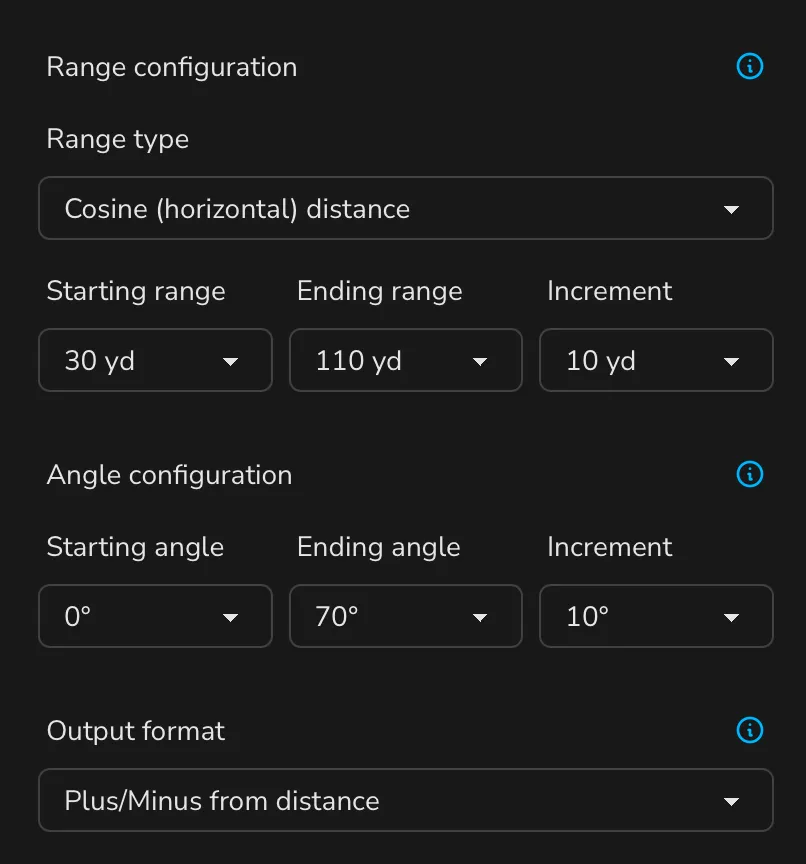
- Range type:
Cosine (horizontal) distance - Starting range:
30 yd - Ending range:
100 yd - Range increment:
10 yd - Starting angle:
0 degrees - Ending angle:
70 degrees - Angle increment:
10 degrees - Output format:
Plus/Minus from distance
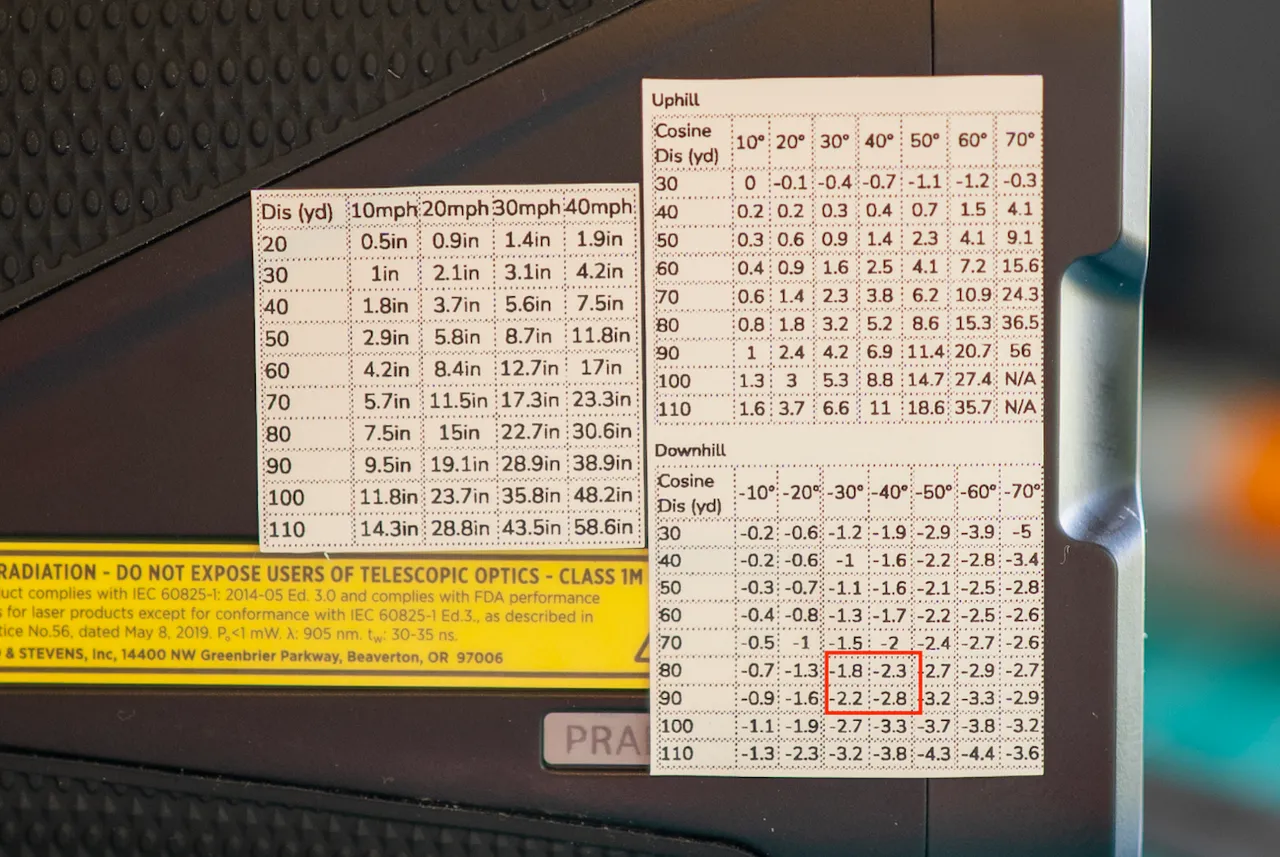
This creates a cut chart that gives you the adjustment from what your rangefinder says when it is in Cosine Mode. For example, if your rangefinder is telling you 60 yards and -20 degrees, you'll subtract 1.3 yards from 60 and shoot the target for 58.7 yards. Think of this like a ballistics layer on top of your rangefinder's Cosine Mode reading.
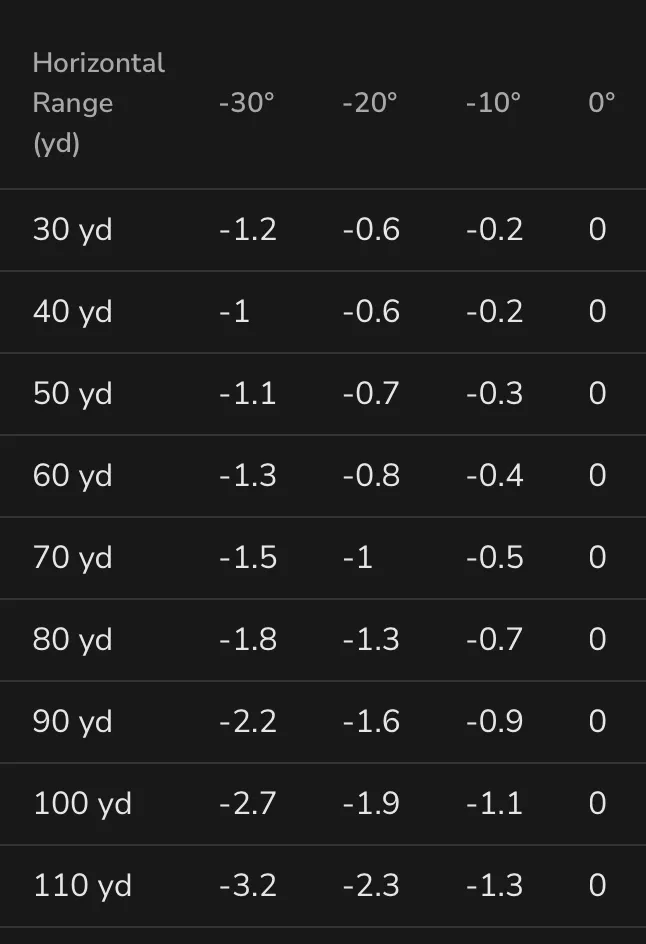
- Range type:
-
Print this out using the 'Compact' print option onto adhesive label paper.
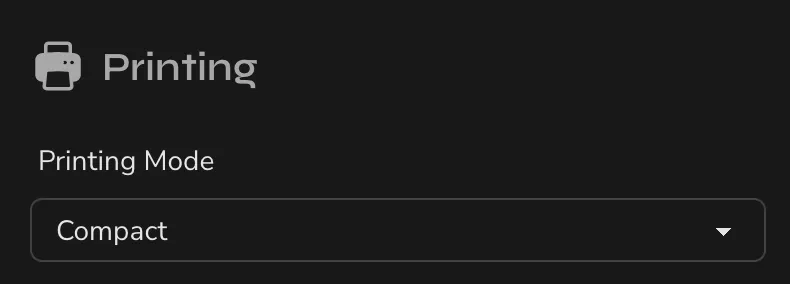
-
Then, stick this on your rangefinder for handy reference.
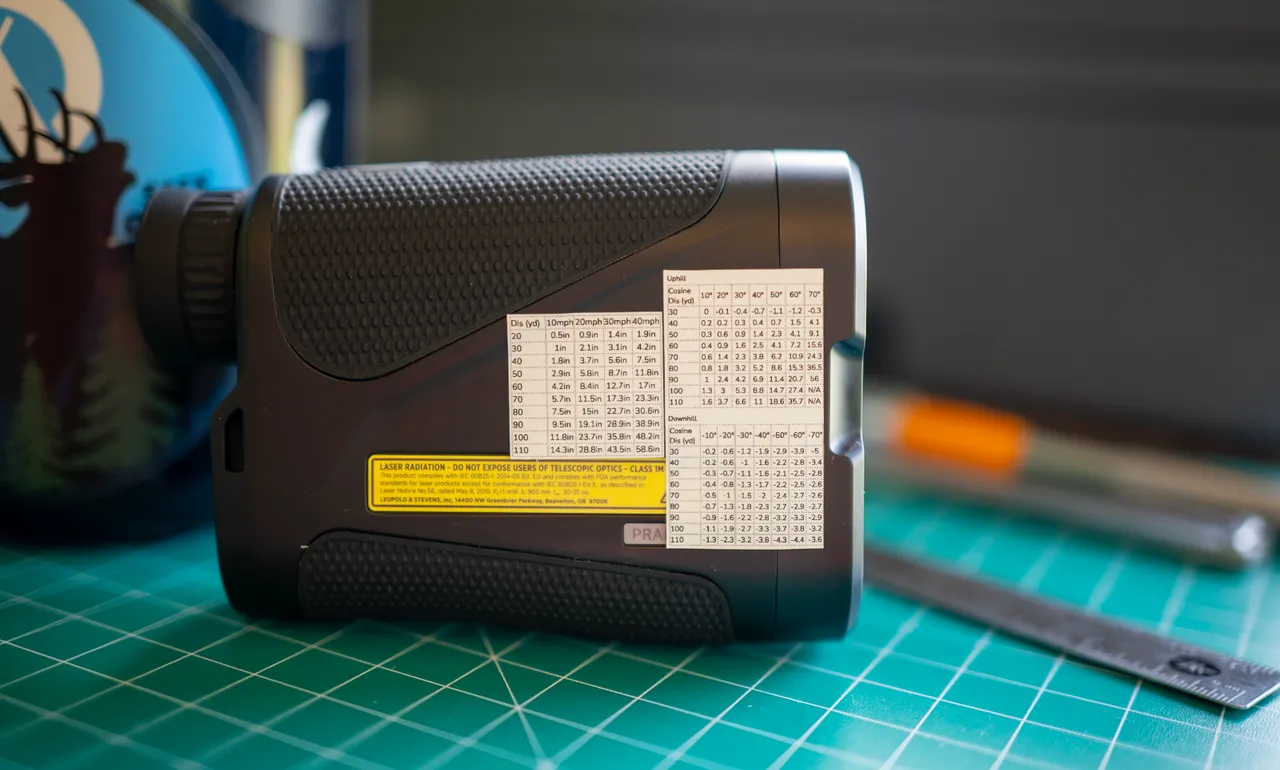


Taking a Shot with your Cut Chart
-
If it's a short shot and mild angle, we can just shoot for what our rangefinder says. It's close enough.
-
If it's a technical shot, or if we have time, we'll take a peak at our cut chart.
Here's an example:
-
Rangefinder says the cosine range is 84 yards, and the angle is -34 degrees.
-
Cut Chart says to subtract about 2 yards from the rangefinder reading for this shot.
-
We'll dial our sight to 82 yards and take the shot.

Rangefinder Accuracy (and other considerations)
Rangefinders are not perfect. They have their own pure accuracy limitations.
If you and several buddies range the same target, it's not uncommon to see a several yards of difference in readings from all of your rangefinders.
Target Color and Material
Target color and material can change your rangefinder's reading. Different colors and materials reflect light differently.
Sunlight
Sunlight can also change your rangefinder's reading. Bright sunlight can add noise to the rangefinder's signal; affecting the accuracy of the reading. Rangefinders generally behave better at dawn and dusk when the sun is down.
Verifying your Rangefinder's Accuracy
The most robust way to verify your rangefinder's accuracy is to use a long tape measure and compare your rangefinder's reading to the actual distance.
Try it at several distances.
Try several different target colors and materials.
Try it in direct sunlight, and try it on a cloudy day.
Try it at noon, and try it at dawn or dusk.
This can be an eye opening exercise!
Obstructions
In our opinion, some ability to range targets through obstructions is a very important feature in a hunting rangefinder. Being able to get through a little bit of grass or brush and get a range on target can make the difference between an seized opportunity and a close call. Some rangefinders have 'First', 'Best', or 'Last' range modes that tells the rangefinder which signals to prioritize.
Fog and Rain
Fog and rain can also affect your rangefinder's reading. Some rangefinders cannot range targets through fog or rain at all. Some models have a 'Fog' mode that helps.